I have lost the settings & information out of the lower right hand box in Realspeed.
In the screen dump you can see some of the boxes are checked but the Headings do not appear in the box nor any numbers.
I've looked under the desk but they're not there so I know they didn't just fall out
It was working until I tried to get the number of sats to show up, changed some settings and bugga.
If anyone can help that would be great but keep it real simple
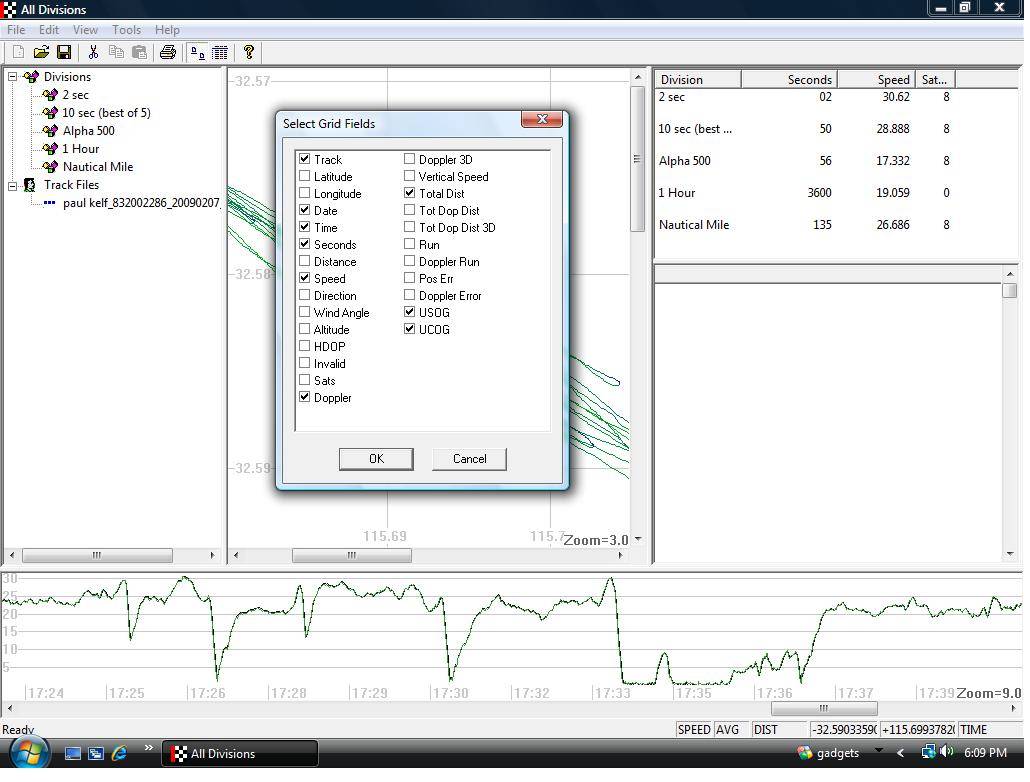
Hi Paul,
Mal is aware of this bug and I believe he has fixed it in the latest version. I believe it was something that broke when he was adding new features and is about the way the columns are displayed.

Thanks Mike but I've tried that already, in fact I've tried just about everything.
Probably have to reload the program
Hi,
I've had this happen to me before, I think it's related to deleting trackpoints. No solution for me apart from closing and re-opening Realspeed.
I usually get frustrated and open 1.924, leave it to chug away in the background and come back half an hour later
Hi Paul, this is a problem that occurs when the write back to the registry gets corrupted.
You can fix this by closing RealSpeed and go to Windows Start and select Run... type in RegEdit in the edit box and hit enter. In the registry tree open up KEY_CURRENT_USER Software RealSpeed Grid Fields and delete the Trackpoints branch. Then run RealSpeed and reselect the fields you want to see.
Let me know if you still have any problems.
Mal
Mal,
I have Office 2000 at work but at home I have Vista.
Vista doesn't seem to have the same commands.
I know your program has had problems with Vista but we usually seem get around them.
With Vista I can't even select "Run" for a start so I'm buggered
Thanks Mal after a long time I have RS working again
Paul (and any other vista users like me, I think this is the series of keystrokes needed in Vista)
Close RealSpeed
click on start (round icon extreme left bottom corner)
type in 'run' in the bottom left where it says 'start search' then hit enter
type in 'regedit' in the text box which appears, and click on ok
click on the small triangle beside 'HKEY_CURRENT_USER' (this opens the tree a bit more)
click on the small triangle beside Software
click on the small triangle beside Realspeed
click on the small triangle beside Grid fields
click on the small triangle beside Trackpoints
click on the word trackpoints and hit delete.
ok to any warning messages
Reopen Realspeed and mine now works having had the same error you had
Hope this works for you (getting RS working again makes me very happy anyway! Maybe the fact we are both on vista and have the same problem is a reflection on Vista)
Thanks guys, all restored.
Came home & the boss had fixed it
She followed Evets instructions & presto
I would have nutted it out eventually
I am really glad you made the original post Paul, I have had RS out of action for months. I now have instructions on how to fix it ( I wonder if it is a problem related to /vista and its ability to have multiple log ons on the same machine )
)
Evet, its good to hear you have it sorted out. If you have any other issues please feel free to contact me at mwright@intellimass.com and I'll do my best to sort them out. It helps me too because I can identify problems and fix them sooner.
Cheers, Mal