Hi all
Looking to see what the options are for internet while cruising. What is the easiest option and works.
Do people just use a phone and hotspot or are there other means to get decent connectivity (within the limits of range).
Also what about outside of Australia (South pacific). Do you just put a local sim into your phone and use that. Do people use a boat modem or range extenders?
We will be 4 people doing the occasional bit of work, but 2 kids with tablets and usual internet/social media, probably on the higher side of usage, but happy to have periods of no connectivity
I use an iPhone in a charging cradle. The cradle also has a connection for an external antenna. I have been pleasantly surprised at how much this extends the range, with an antenna mounted off the pulpit about 4m above the water. Of course if you want any sort of range you would have to be with Telstra or one of the resellers that used them as carrier (such as Aldi which I use).
I think range extenders are illegal in Oz.
Cheers, Graeme
if going the multiple SIM route, you might want to look into eSIMs, which are starting to become more widely available now...
On our recent trip to Malaysia I had a Motorola Moto E5 phone.
It ia a dual sim phone. I bought an Australia Post Travel sim for economical phone calls to back home.
The coverage is amazing. You don't get international roaming charges and at $0.25/min for zone 1 countries and $1.00/min for zone 2 it does not break the bank.
For data/internet I bought a local sim with data pack. In the month away I only used half of the travel sim credit and a quarter of the data pack.
The phone does not have a jack for an external antenna so you will have to figure out some other method for range extension.
Check out Aus Post Travel sim here. www.aptravelsim.com/
Hi Dralyagmas, I set up one of those little mobile routers that take a sim card. It has an external antenna jack and I have an antenna that I can mount on the pushpit. I never use it though. So I just use my Iphone running Aldi mobile (telstra) plugged into a usb and that works a treat. Added advantage of only having to run one account with lots of data that now accumulates on the Aldi plans.
I'm interested in your iphone charging cradle though Graham, I didn't realise that plugging into one of those could extend your range with an antenna, is that happening through the lightning connectore then? Do you have a link to the one you use please?
Mate of mine has one of these https://www.cel-fi.com.au/ in his fourby and we were out gold prospecting in the middle of nowhere where I had absolutely nothing on my phone and out of the blue his phone rings and it's his missus checking up on him. Yes it does work. No it is not illegal to use.
Select to expand quote2bish said..
Hi Dralyagmas, I set up one of those little mobile routers that take a sim card. It has an external antenna jack and I have an antenna that I can mount on the pushpit. I never use it though. So I just use my Iphone running Aldi mobile (telstra) plugged into a usb and that works a treat. Added advantage of only having to run one account with lots of data that now accumulates on the Aldi plans.
I'm interested in your iphone charging cradle though Graham, I didn't realise that plugging into one of those could extend your range with an antenna, is that happening through the lightning connectore then? Do you have a link to the one you use please?
I got the cradle from Comnet:
www.comnet.com.au/epages/shop.sf/en_AU/?ObjectPath=/Shops/comnet/Categories/Cradles
and a 6db marine antenna from:
zcg.com.au/
Both were very helpful. Extra advantages are that you always know where your phone is, it's always charged, and it's safe from damage. The only time my phone failed on the boat me was when I left it out of the cradle and a tiny window drip killed it with salt water!
Add a little Bluetooth speaker and you can conduct calls anywhere in the boat.
Ah it's some kind of induction antenna magic, awesome! Expensive, but I think I'll grab one. Thanks for that!
Select to expand quotewongaga said..
I got the cradle from Comnet:
www.comnet.com.au/epages/shop.sf/en_AU/?ObjectPath=/Shops/comnet/Categories/Cradles
Less than half price from this lot and the questions and answers at the bottom are interesting. I have an analogue phone antenna on my masthead with a plug at the chart table. Might have to do some more investigating.
onwireless.com.au/iphone-htc-blackberry-nokia-telstra-zte-samsung-cal9002-mobile-phone-patch-cable-adapter.html
Select to expand quoteThis is copied and pasted from Whirlpool forums that may be of interest.
Q I'm trying to figure out a way to boost the signal, ideally to aim the phone at a tower. I've seen that there is a car kit that provides this via: "a passive induction antenna coupler. When you place your device into the cradle, the antenna coupler uses passive induction to transfer the signal between the phone and the coupler, and thus to and from the external antenna. ( When used with external antenna )" Has anyone had any experience in using this or boosted a Note 9 antenna signal ?
Ans. The bottom line is that it's worth trying if it's like $1 or whatever, but it's a roll of the dice if it'll work.Passive induction is a real thing. But the antennae in mobile devices these days are extremely complex in design and use fractal mathematics and hybrid materials to optimize their efficiency. Simply making them bigger or longer won't necessarily help at all. They are already the best they can be for their size and for the frequency range(s) involved. No single inexpensive antenna will be well-enough designed to work, except perhaps by random chance...If you remember analog TV rabbit ears - you could add tinfoil to them, or your hands, and sometimes it'd work and sometimes it wouldn't? Sometimes you even had to stand just in a particular place for it to be perfect, otherwise it was terrible? It's a lot like that... very sensitive to changes. The antenna array in your phone already is carefully designed to work from any angle and at the maximum distance manageable.
Select to expand quoteRamona said..This is copied and pasted from Whirlpool forums that may be of interest.
Q I'm trying to figure out a way to boost the signal, ideally to aim the phone at a tower. I've seen that there is a car kit that provides this via: "a passive induction antenna coupler. When you place your device into the cradle, the antenna coupler uses passive induction to transfer the signal between the phone and the coupler, and thus to and from the external antenna. ( When used with external antenna )" Has anyone had any experience in using this or boosted a Note 9 antenna signal ?
Ans. The bottom line is that it's worth trying if it's like $1 or whatever, but it's a roll of the dice if it'll work.Passive induction is a real thing. But the antennae in mobile devices these days are extremely complex in design and use fractal mathematics and hybrid materials to optimize their efficiency. Simply making them bigger or longer won't necessarily help at all. They are already the best they can be for their size and for the frequency range(s) involved. No single inexpensive antenna will be well-enough designed to work, except perhaps by random chance...If you remember analog TV rabbit ears - you could add tinfoil to them, or your hands, and sometimes it'd work and sometimes it wouldn't? Sometimes you even had to stand just in a particular place for it to be perfect, otherwise it was terrible? It's a lot like that... very sensitive to changes. The antenna array in your phone already is carefully designed to work from any angle and at the maximum distance manageable.
Signal strength displayed on my iPhone 4S increased substantially when I put it into the cradle. I have verified the benefit during numerous Bas Strait cruises. Perhaps the Whirlpool poster has used a cheapo cradle, or perhaps he's just waffling. My personal experience is: quality cradle + good antenna = major benefit.
Select to expand quote
I had a look here - which antenna did you get?? I have the cradle but a cheap antenna!!
Select to expand quotewongaga said..Ramona said..
Signal strength displayed on my iPhone 4S increased substantially when I put it into the cradle. I have verified the benefit during numerous Bas Strait cruises. Perhaps the Whirlpool poster has used a cheapo cradle, or perhaps he's just waffling. My personal experience is: quality cradle + good antenna = major benefit.
The reviews are mixed. Some people report excellent results, others no difference. I think it's all down to the phone used and it's inbuilt antenna. Some are obviously more suitable than others.
Mine is a model SGDB-TPM from ZCG-Solar, described on the blurb sheet as a "Ground Independent Multiband Cellular Mobile Phone Antenna", but it's nearly 7 years old, so no doubt there is a new model. ZCG-Solar were very helpful and if you gave them a call I have no doubt they would advise you.
I use a netgear aircard purchased second hand for about a hundred bucks. With a battery and wifi, i can haul it high on a halyard in a waterproof bag to increase range. A wireless router at the nav station talks to the aircard and puts the internet onto the wired and wireless boat network to which all devices connect.
Works like a charm!
From Shaggy's post:
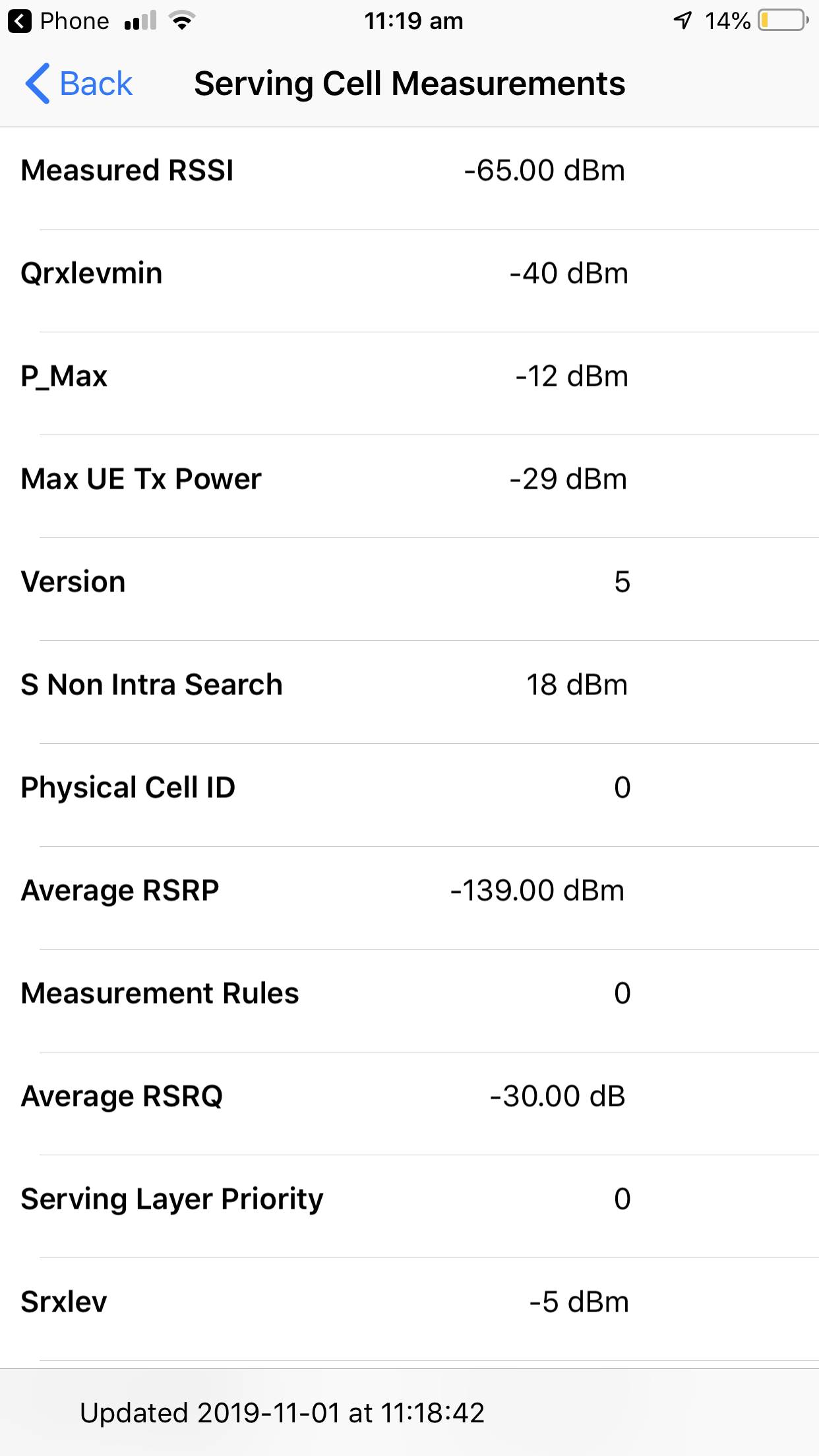
Dralyagmas, there's a neat trick with your phone to measure network signal strength , and importantly signal quality. You can try this anywhere. It is carrier specific, but if you have a telstra phone dial *3001#12345#*. You have to manually enter it and hit call.
A notepad view will appear. Select the 'Serving cell measurements' option.
Didn't work for me - got "this no. is not connected". Any tricks ,Shaggy??
G'day SaintPeter,
which network are you on mate? And less important but just in case. what phone?
One oddity I can think of at the moment, if you save the number as a contact (which I have) you can't dial from the contact by pressing on the number. You have to manually enter it on the keypad and dial.
ive attached a screen shot of what it should look like. And I'll give yours a go if you let me know details.
Cheers,
SB

Select to expand quotesaintpeter said..
Didn't work for me - got "this no. is not connected". Any tricks ,Shaggy??
Doesn't work for me either using Samsung with Telstra!!
I just go to Settings > About phone > Status > SIM card status > Signal strength - tells you what your dBm & asu is.
According to Mr Google a signal of -60dBm is nearly perfect, and -112dBm is call-dropping bad. If you're above about -87 dBm, Android will report a full 4 bars of signal.
Select to expand quoteLazzz said..saintpeter said..
Didn't work for me - got "this no. is not connected". Any tricks ,Shaggy??
Doesn't work for me either using Samsung with Telstra!!
I just go to Settings > About phone > Status > SIM card status > Signal strength - tells you what your dBm & asu is.
According to Mr Google a signal of -60dBm is nearly perfect, and -112dBm is call-dropping bad. If you're above about -87 dBm, Android will report a full 4 bars of signal.
Thanks Lazz, I don't have a samsung, Good to know!
Select to expand quoteLazzz said..saintpeter said..
Didn't work for me - got "this no. is not connected". Any tricks ,Shaggy??
Doesn't work for me either using Samsung with Telstra!!
I just go to Settings > About phone > Status > SIM card status > Signal strength - tells you what your dBm & asu is.
According to Mr Google a signal of -60dBm is nearly perfect, and -112dBm is call-dropping bad. If you're above about -87 dBm, Android will report a full 4 bars of signal.
Telstra network. On my farm, 20 km from tower on mountain - line of sight: -110dBm 3asu. Rarely get 4G, usually 3G or HSPA. Occasional call drop-outs, data very slow. I will be fascinated to try this again when at sea in southern Port Phillip Bay and even out in the Strait. So far I have always noticed I had 4G on board.
Anyway this is all very fine for coastal cruising - but for crossing oceans, here is some interesting reading:
www.morganscloud.com/2019/10/15/new-satellite-communications-systems/
Select to expand quoteLazzz said..saintpeter said..
Didn't work for me - got "this no. is not connected". Any tricks ,Shaggy??
Doesn't work for me either using Samsung with Telstra!!
I just go to Settings > About phone > Status > SIM card status > Signal strength - tells you what your dBm & asu is.
According to Mr Google a signal of -60dBm is nearly perfect, and -112dBm is call-dropping bad. If you're above about -87 dBm, Android will report a full 4 bars of signal.
HI Lazz,
Those numbers are correct for the signal strength, which is the most critical value. The next most critical number is the noise floor. The difference between the peak signal strength and your noise floor is your SNR. SNR has a direct corellation to your bit error rate, which determines your overall signal quality. For mobile networks, an optimal SNR is about 20db for data, and approx 25db needed for a streaming service like voice or video over ip.
Example:
- peak signal - 70dbm
- noise floor -100dbm
-SNR = 30db.
That's a good set of numbers.
A badly positioned repeater like a Cel_Fi, will increase the noise floor, degrading your SNR and making for a crap service even with a stellar peak signal. The most common cause of increased noise floor on a boat is the antennas being situated too close together. A sample reading taken from such a situation
- peak signal - 70dbm
- noise floor -85bm
-SNR = 15db.
This was a horrible internet connection, but it had 4 bars (peak signal) on the phone.
In wired networks, the optimal SNR number is 34db, but wireless has too many challenges to often achieve that number reliably.
Cheers!
SB